Niche Please
Defining a tool that serves a niche audience within the crochet world.
(Year)
In Progress
(Services)
UIUX, app creation
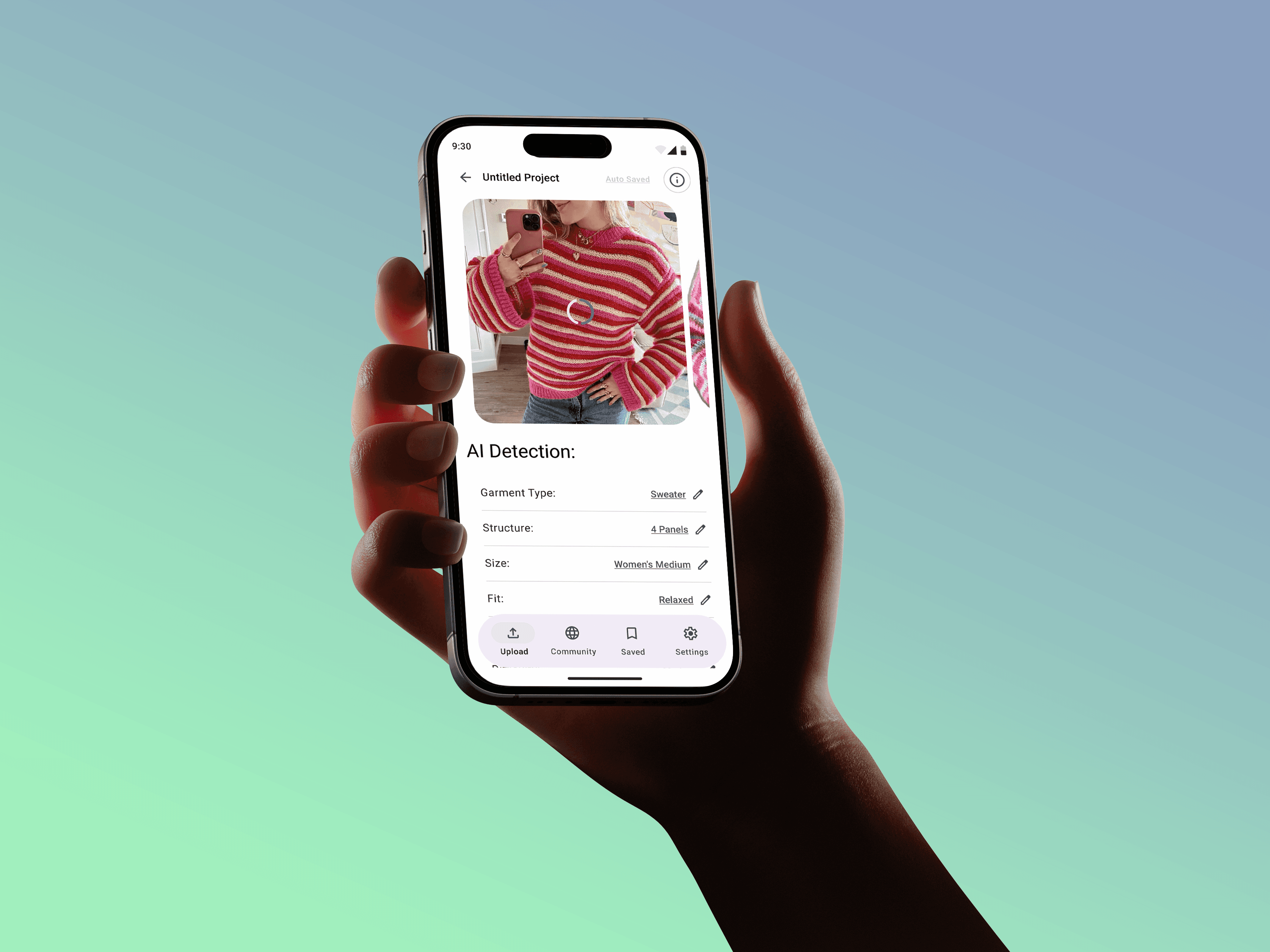
An app created for digitally native, self-taught makers who use crochet as a creative outlet and a way to recreate fashion.
How might I help digital-first crochet artists translate visual garment inspiration into accurate, customizable crochet patterns without requiring advanced pattern-writing knowledge?
Crocheters often rely on visual inspiration but lack the tools to translate garments into clear, customizable patterns. This app bridges that gap by guiding users through a structured, step-by-step system that converts images into crochet-ready panels, stitch grids, and written patterns. This makes garment creation more accessible, visual, and adaptable to individual sizing and skill levels.
First Round User Testing:
Kaley:
The jump from upload to AI detection is kind of confusing. If your goal is to make it feel realistic, I think that it does that too fast in one screen. It’s nice that I can edit the detection though in case it was wrong.
I didnt understand what the sliders did. Like I kind of get the concept, but I don’t understand the equation. Might need a description.
I didnt like the written pattern as much since it was a long list. I wish it was like sorted or had a bit different navigation.
Karen:
In case someone uploads an image that AI can't detect, I think you might need an error message
If im looking closely, I can see that the grid is changing, but I feel like maybe it should also show the equation as your sliding it.
It was unclear that I could click on the panels to get a close up. Maybe have them outline or something?
For written vs tutorial, I feel like you should explain one is more advanced and the other more beginner.
Loved the written pattern as an advanced crocheter, and I really liked the check boxes, I think thats really helpful to not get lost.
Cate:
I thought I had already started a project when it said start project, but it makes sense. Maybe just change the button title.
Before clicking into the pattern, I wasn’t really sure what tutorial meant, and thought it would be like a video? It was more step by step and visual guidance, but not what I was expecting.
Got a little lost editing and wanted to go back and see things.
Might be helpful to add breadcrumbs instead of a consistent, but unlabeled back arrow
Niche Please
Defining a tool that serves a niche audience within the crochet world.
(Year)
In Progress
(Services)
UIUX, app creation
An app created for digitally native, self-taught makers who use crochet as a creative outlet and a way to recreate fashion.
How might I help digital-first crochet artists translate visual garment inspiration into accurate, customizable crochet patterns without requiring advanced pattern-writing knowledge?
Crocheters often rely on visual inspiration but lack the tools to translate garments into clear, customizable patterns. This app bridges that gap by guiding users through a structured, step-by-step system that converts images into crochet-ready panels, stitch grids, and written patterns. This makes garment creation more accessible, visual, and adaptable to individual sizing and skill levels.
First Round User Testing:
Kaley:
The jump from upload to AI detection is kind of confusing. If your goal is to make it feel realistic, I think that it does that too fast in one screen. It’s nice that I can edit the detection though in case it was wrong.
I didnt understand what the sliders did. Like I kind of get the concept, but I don’t understand the equation. Might need a description.
I didnt like the written pattern as much since it was a long list. I wish it was like sorted or had a bit different navigation.
Karen:
In case someone uploads an image that AI can't detect, I think you might need an error message
If im looking closely, I can see that the grid is changing, but I feel like maybe it should also show the equation as your sliding it.
It was unclear that I could click on the panels to get a close up. Maybe have them outline or something?
For written vs tutorial, I feel like you should explain one is more advanced and the other more beginner.
Loved the written pattern as an advanced crocheter, and I really liked the check boxes, I think thats really helpful to not get lost.
Cate:
I thought I had already started a project when it said start project, but it makes sense. Maybe just change the button title.
Before clicking into the pattern, I wasn’t really sure what tutorial meant, and thought it would be like a video? It was more step by step and visual guidance, but not what I was expecting.
Got a little lost editing and wanted to go back and see things.
Might be helpful to add breadcrumbs instead of a consistent, but unlabeled back arrow
Niche Please
Defining a tool that serves a niche audience within the crochet world.
(Year)
In Progress
(Services)
UIUX, app creation
An app created for digitally native, self-taught makers who use crochet as a creative outlet and a way to recreate fashion.
How might I help digital-first crochet artists translate visual garment inspiration into accurate, customizable crochet patterns without requiring advanced pattern-writing knowledge?
Crocheters often rely on visual inspiration but lack the tools to translate garments into clear, customizable patterns. This app bridges that gap by guiding users through a structured, step-by-step system that converts images into crochet-ready panels, stitch grids, and written patterns. This makes garment creation more accessible, visual, and adaptable to individual sizing and skill levels.
First Round User Testing:
Kaley:
The jump from upload to AI detection is kind of confusing. If your goal is to make it feel realistic, I think that it does that too fast in one screen. It’s nice that I can edit the detection though in case it was wrong.
I didnt understand what the sliders did. Like I kind of get the concept, but I don’t understand the equation. Might need a description.
I didnt like the written pattern as much since it was a long list. I wish it was like sorted or had a bit different navigation.
Karen:
In case someone uploads an image that AI can't detect, I think you might need an error message
If im looking closely, I can see that the grid is changing, but I feel like maybe it should also show the equation as your sliding it.
It was unclear that I could click on the panels to get a close up. Maybe have them outline or something?
For written vs tutorial, I feel like you should explain one is more advanced and the other more beginner.
Loved the written pattern as an advanced crocheter, and I really liked the check boxes, I think thats really helpful to not get lost.
Cate:
I thought I had already started a project when it said start project, but it makes sense. Maybe just change the button title.
Before clicking into the pattern, I wasn’t really sure what tutorial meant, and thought it would be like a video? It was more step by step and visual guidance, but not what I was expecting.
Got a little lost editing and wanted to go back and see things.
Might be helpful to add breadcrumbs instead of a consistent, but unlabeled back arrow